Search This Blog

Showing posts with label Tablets. Show all posts

Wednesday, 9 July 2014

New revolutionary ipad in lenovo series....

Lenovo ThinkPad 10 review: A thinner, lighter Windows tablet with a high-res display


Lenovo’s ThinkPad 2 was a great tablet, but Intel’s older Atom platform struggled to run Windows 8 smoothly, the tablet itself was chunky, and its screen had fewer pixels than the smaller, but newer ThinkPad 8. The ThinkPad 10 brings all of those old spots up to spec without sacrificing any of the great quality or productivity perks of the ThinkPad line.
Pulling the ThinkPad 10 out of its box, I was struck by how thin and light, yet solid it felt. The ThinkPad 10 is the thinnest of the current crop of larger screened Windows tablets we’ve seen, just edging out the new Surface Pro 3 (0.35 inches vs 0.36 inches). It’s quite a bit slimmer than both the Asus Transformer Book T100 (0.39 inches) and the Dell Venue 11 Pro (0.4 inches). The tablet weighs a scant 1.32 pounds, feeling much more like my iPad Retina (third-generation) than either the Dell or Asus.
Lenovo ThinkPad 10
The 1920x1200 display is easily the ThinkPad 10's best feature. 
The soft, matte plastic back is not quite the grippy, soft-touch texture of older ThinkPads, but it still feels nice in the hand. There's a little flex to the screen because it’s not a metal back, but not a worrisome amount.
Speaking of the screen, the 1900x1200 pixel resolution is a joy to work with. I really appreciate the extra space over a 1080p screen and find that, even at only 10.1 inches, I’m comfortable with the scaling turned down some to fit more on the screen. The brightness range is also wide, going from bright enough to compete with window glare to dim enough to read in the dark without burning out my retinas.

The faster Atom in a thinner package can heat up at times.

Ports are mostly hidden behind little doors, which, while less convenient, leaves the edges cleaner-looking. On the right side is an open micro USB/headphone jack, and behind a door you’ll find a SIM card slot (ours didn’t have WWAN, but it will be available on certain models) and a microSD slot. Behind door number two on the left is a full-size USB 2.0 port in addition to the port for the power adapter. Yes, a full-size USB port and a real power port. No clogging up the microUSB with either of those.
Lenovo ThinkPad 10
The Quickshot cover is a must-have accessory for the ThinkPad 10.
One odd design decision is the mismatched corners. The bottom two corners are square, more in line with the boxy ThinkPad aesthetic, and they fit well in the various docks. The top corners are more rounded, as if Lenovo just couldn’t commit to square corners all around. The square bottom corners do feel awkward to hold after a while, so despite how seamlessly they fit in the dock, it may have been better to round all the corners.
Lenovo chose to stick with the Atom-class processors in the ThinkPad 10, but they're taking advantage of the fact that the Z3795 is 64-bit capable. Even though our review unit has only 2GB of RAM, there is the option to upgrade to 4GB with 64-bit Windows. You can purchase models with either 64- or 128GB of storage.
It should be noted that the faster Atom in a thinner package can heat up at times. The tablet stayed cool when I was just writing or browsing, but the right-hand side got uncomfortably warm several times while I was performing more intense tasks.
Lenovo ThinkPad 10
As much as I like the Ultrabook keyboard, the tablet reclines too far back in its dock to be usable.
Despite having a slightly faster Atom processor than the similarly equipped Dell Venue 11 Pro, the ThinkPad 10 performed just behind it on most of our benchmark tests. Both tablets come out ahead of others outfitted with the more common Atom Z3740 chip, like the Asus Transformer Book T100 and the Acer Switch 10.
Lenovo ThinkPad 10
The ThinkPad 10's benchmark performance is on par with other Intel-powered Windows tablets, although it finished slightly behind Dell's Venue Pro 11.
Battery life on the ThinkPad 10 is good for a light day’s work, lasting 5 hours and 45 minutes—that’s just 11 minutes longer than the Dell Venue 11 Pro. Our battery rundown test is particularly harsh, so you might get better results. Dell still has the advantage though, as its mobile keyboard dock comes with an extra battery that significantly boosts its runtime. The ThinkPad’s Ultrabook dock ($129) does not have a battery option.
Lenovo ThinkPad 10
You should be able to get a full day's work out of the ThinkPad 10's battery.

Accessories

What the ThinkPad Ultrabook keyboard dock does have is some fantastic keys. They are a little close together, which took some getting used-to, but the travel and feedback are right in line with what I’m used to from ThinkPad keyboards. Once I adjusted to the spacing, I was happy typing all of this review and several other things on it.
The Ultrabook keyboard is not a clamshell-style dock, like that of the Asus T101t or the Dell Venue 11 Pro. The tablet just sits in a groove in the back, held by magnets. You must take the tablet out and slot it into a different groove in the back to cover the screen for travel. It's unfamiliar, but the motion to close it is not too different from that of closing a clamshell. The problem is that the docked tablet is stuck at a fixed angle, tilted way too far back for my taste.
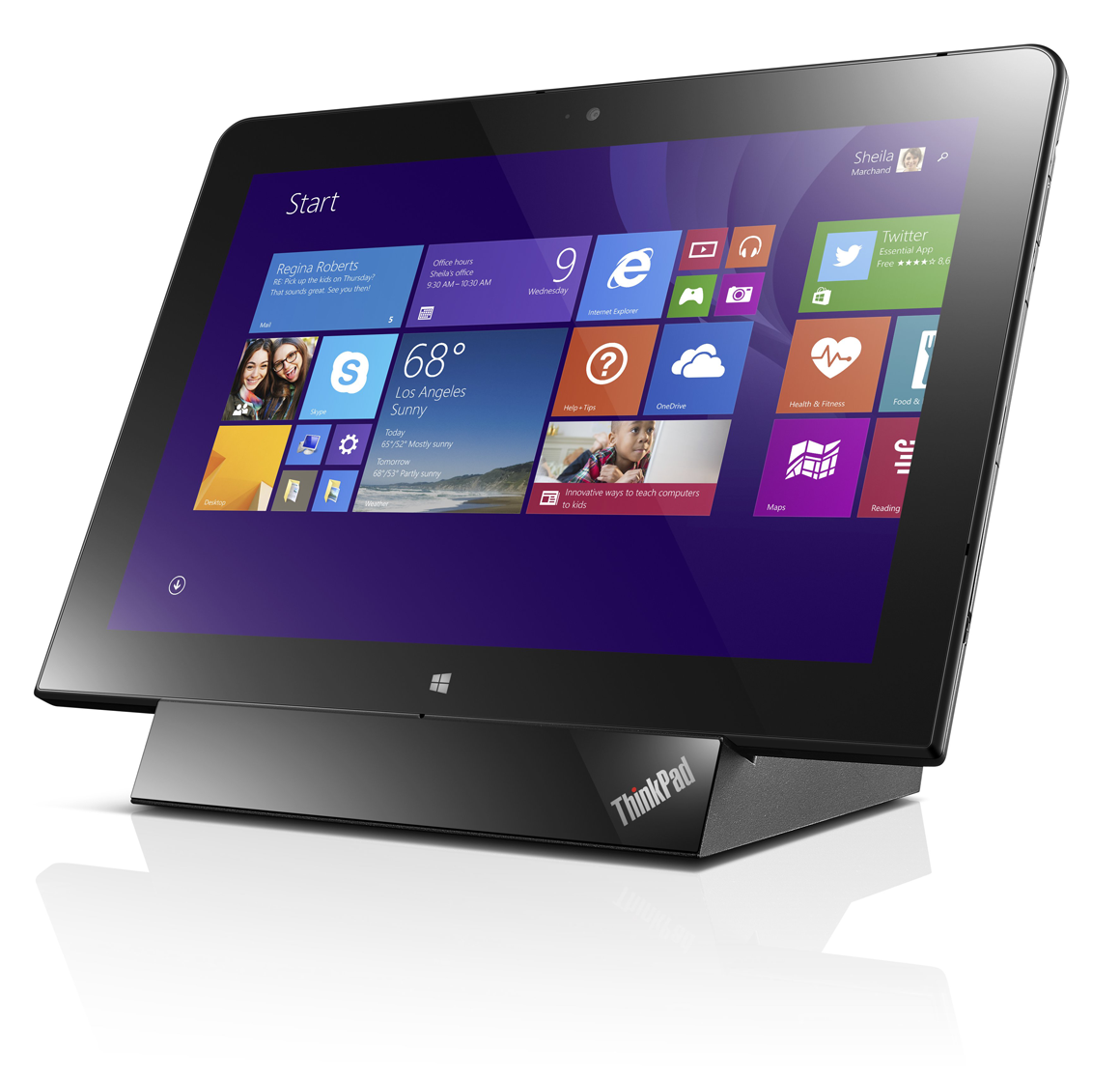
Lenovo ThinkPad 10
The $129 tablet dock converts the ThinkPad 10 into a miniature all-in-one PC, with the option of connecting a second display.
There is also a desktop dock available, which holds the tablet at a better angle and provides two USB 3.0 ports, a full-sized HDMI port, and ethernet. The tablet slots onto a physical connector that sticks up and can be tricky to seat properly. I left it on the dock for a few hours thinking it was charging, only to find it wasn’t quite all the way on.
Lenovo also makes a Quickshot cover ($45) for the ThinkPad 10, which is every bit as nice as the one that goes with the ThinkPad 8. I find using the camera on a 10-inch tablet to be a bit gimmicky, but the 8MP rear camera takes nice shots, and the Quickshot cover makes it easy to get into the camera app to capture a moment. The cover folds in the middle to prop up the tablet at a range of good table-use angles. It attaches magnetically using the same guide holes as the various docks, so you must take it off to dock the tablet.
Lenovo ThinkPad 10
The included digitizer pen is a great note-taking tool for apps such as Evernote.
Last, but not least, the ThinkPad 10 comes with a digitizer pen. The battery-less pen writes and draws smoothly with no lag. There is no pen garage in the tablet, but there is a garage in the Ultrabook dock, and there’s a pen loop on the Quickshot cover.

The dock's a big deal

The ThinkPad 10 ticks a lot of the right boxes. The most important element of this tablet, its screen, is top-notch. The Atom processor is more than capable for everyday tasks, especially with a 4GB RAM option. A wide array of accessories covers the majority of use cases and input preferences.
The only thing holding me back from scoring this tablet higher than its closest competition, the Dell Venue 11 Pro, is the fixed angle on Lenovo’s Ultrabook dock. It wasthat annoying to use on a table with the screen tipped so far back. If I had to buy one or the other, I still lean toward the ThinkPad 10. But I’d pass over the Ultrabook dock in favor of the Quickshot cover to hold the pen and prop up the tablet. Then I’d need to find the ultimate Bluetooth keyboard to go with it.

At a Glance

Lenovo's latest productivity and business-oriented ThinkPad tablet checks all the right boxes on paper and is a joy to use in real life, but it suffers from a few ill-conceived design decisions.
  • Strong performance
  • Good battery life
  • Beautiful 1920x1200-pixel display
  • Very thin and light

Cons

  • Ultrabook keyboard dock allows just one angle
  • Can run warm to hot with demanding apps
Lenovo ThinkPad 10

Tuesday, 8 July 2014

Samsung Galaxy Tab S reviews

The two-tablet assault as Samsung sets its sights on the iPad...again


The new Galaxy Tab S is something of a conundrum: on the one hand, it represents a big shift from Samsung, one that promises to finally give it something that can be considered a rival to the iPad, on the other, an over-reliance of familiarity.

The Galaxy Tab S range packs one major advantage over the competition: one of the best screens on the market to be plugged into a tablet.
  • Buy Samsung Galaxy Tab S 8.4" Tablet - Bronze, Bronze at PC World for £319.99

At 8.4- and 10.5-inch it uses Samsung's Super AMOLED technology make colours hyper-vibrant, contrast really deep and rich and the resolution, at 2560 x 1600, is pin sharp at all screen sizes.
  • So, what's the verdict on Samsung's possible iPad-beater?
It's hard to overstate how beautiful the screen is – for some people, the Super AMOLED technology used in the Samsung Galaxy smartphone range is too much, too over-saturated in colour, but on these tablets I think it's just right; and if you're that bothered, there are settings to tweak the colour up and down to a more LCD-like setting.
Samsung Galaxy Tab S review
The 8.4- and 10.5-inch Galaxy Tab S range.
However, while it's ace that Samsung has made this feature more accessible (a simple tap to make the screen more or less colour saturated) it's only available in video. To me, that's fine as it's the main place I feel I want a little less colour power, but it would be good to see the same trick in photos too.
At 10.5 inches, the Tab S is a real rival to the iPad Air in terms of sharpness and screen quality – and that's saying something impressive, as the Air has one of the better displays on the market.
Samsung Galaxy Tab S review
The screen looks sharper on the Tab S
As the size scales down, the sharpness of the screen goes up for the Tab S range, with the 8.4-inch version looking as sharp as a smartphone display (when held a little further from the face) but with the benefits of a larger screen.
Samsung Galaxy Tab S review
A brilliantly vibrant screen
Viewing the web or video on these tablets is something of a dream – it's hard to explain just how nicely nearly everything looks on these displays.
Samsung Galaxy Tab S review
Samsung oddly chose to use the Tab Pro to show a 'poorer' LCD screen
I will say this: if you're someone that hates the way Super AMOLED looks on phones then you're going to hate the Galaxy Tab S screens as well. Samsung took great pains to point out how much better the new display was side by side with an LCD (oddly choosing to lament the colour performance of its very own Galaxy Tab Pro) but it just looked different, not better - it depends on your preference.
Samsung Galaxy Tab S review
The reading mode
The reading mode, which seems to mostly just enhance the brightness to a more acceptable level - good, but nothing major. The same can be said for the adaptive display, which can moderate the screen's output depending on the lighting type - it was probably too subtle to test, but the demonstration didn't blow me away.
Samsung Galaxy Tab S review
Full colour mode
Samsung Galaxy Tab S review
'Normal' mode

Design

If Samsung has stayed true to its ability with the screen technology, the same thing can be said for the design too. Sadly, while the former is a massive plus I'm still not sold on the way these tablets look.
Samsung Galaxy Tab S review
The Galaxy Tab S 10.5
Samsung Galaxy Tab S review
The Galaxy Tab S 8.4 - designed for use in portrait mode
Samsung Galaxy Tab S review
The Tab S range still relies too heavily on plastic – while we were told in immense detail how the new devices were inspired by 'modern architecture' and 'the sunrise on crisp white snow', they've still got the same dimpled and rubberised back as seen on the Galaxy S5.
I've said this time and again with the smartphones and, to a degree, it hasn't mattered so much as they've sold in their droves.
Samsung Galaxy Tab S review
The same dimpled effect is back - but no waterproofing here
But Samsung tablets haven't enjoyed the same level of market dominance, and that's partly because they don't ooze the same premium quality that the likes of the Sony Xperia Z2 Tablet and iPad Air manage so easily.
Combine that with the dimpled back (the same seen on the Samsung Galaxy S5 and K Zoom) and I just don't feel like I'm holding something that's as well put together as the competition.
Samsung Galaxy Tab S review
The 'Titanium Bronze'
Even the Google Nexus 7, which is likely to cost a fair bit less than the Tab S, feels better-packaged in my opinion, and is something Samsung needs to get right, and quickly.
The tablets aren't even waterproof, which was one major part of the Galaxy S5 and went some way to explaining the decision to go with a rubberised back.
Samsung Galaxy Tab S review
However, the materials used aside, the Samsung Galaxy Tab S range does make some clever choices in terms of design. For instance, both are 6.6mm thin at the narrowest point, which is hugely impressive and allows for extended holding without causing wrist strain (helped in part by the 294g / 465g weight).
Samsung Galaxy Tab S review
The fingerprint scanner
The biometric technology is back again, as it was with the Galaxy S5, and is situated in the same place, the home key. It's not as simple to swipe the finger down, especially on the larger screens in the range, as it requires balancing it in one hand and can be a little awkward.
Samsung Galaxy Tab S review
It's accuracy is a little off as a result too, although that's something that requires day in, day out testing to properly assess - it worked for the most part, but that balance (especially on the larger 10.5-inch slate) is something of a slight concern).

New magic of Lenovo comes to reatin its place in the market

Lenovo launches three new Android smartphones......

Lenovo launches three new Android smartphones with something for all
Lenovo's new S850 smartphone brings an all-glass design

Just because Lenovo recently acquired Motorola, doesn't mean it plans to stop pushing its in-house smartphones, something evidenced by the launch of three new handsets at MWC 2014.
The company has unveiled the S860, the S850 and S660 Android handsets, promising a little bit of something for all sectors of the market.
The S860 is the flagship device, with a 5.3-inch, as-yet-unspecified 'HD' screen, 2GB RAM and a MediaTek quad-core processor, but the real kicker is the promise of all true all day battery life.
Lenovo S860
The flagship Lenovo S860
The company doesn't mention the size of the cell in its news release, but claims it can hang for 24 hours of talk time, making it ideal for business users. Users will even be able to use the phone to charge other devices using the microUSB cable.

Snaring fashionistas

Second in line is the 5-inch S850 handset (main article photo). Its claim to fame is a unique all-glass design that could snare smartphone fashionistas.
The S850 also packs a 13-megapixel camera, a 5-megapixel front-facing snapper, and also has a MTK quad-core chip doing the donkey work.
Last, but not least, comes the S660, which the company is pitching as an "all rounder" for "value seekers." It has a brushed metal design and also has a quad core processor on board.
Lenovo S660
The all-rounder S660
Lenovo, in its media release, hasn't divulged everything we'd like to know about these phones. The spec sheets have a lot of gaps that need to be filled, such as Android versions and screen resolutions, but TechRadar has a strong presence in Barcelona this week, so we'll aim to get to the bottom of it.